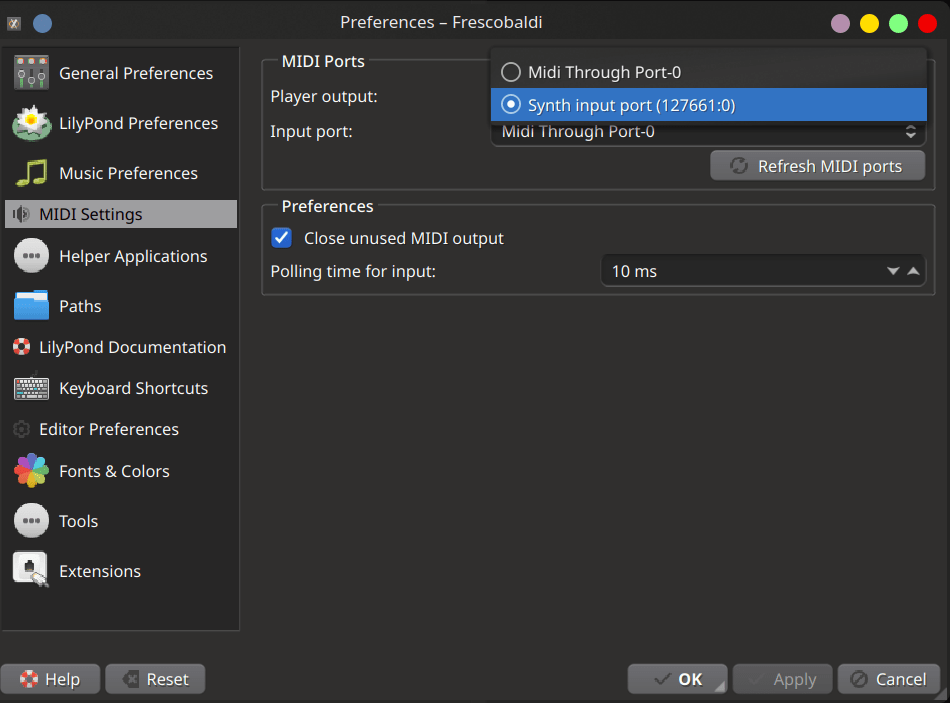
 Frescobaldi MIDI Settings
Frescobaldi on Arch
Getting Frescobaldi and lilypond to work on arch is straightforward but badly documented. Unfortunately, the wiki is also locked for me, so I am creating this page. Hopefully, it will help you too.
-
pacman -S frescobaldi lilypond
To install a soundfont, there are no specific recommendations with Frescobaldi or LilyPond. However, Tuxguitar suggests installing soundfont-unison, so we'll use that. You can choose any soundfont, like soundfont-fluid. After installation, create a symlink to set your preferred soundfont as the default:
-
cd /usr/share/soundfonts -
sudo ln -s Unison.sf2 default.sf2
Now you need to start the fluidsynth. You can follow the Arch Wiki for fluidsynth to start it. You can choose to install Timidity++ also and follow that too. Following steps are similar for either:
-
pacman -S fluidsynth -
systemctl --user restart fluidsynth.service
I go one step further and enable the service so that it starts every time login as I tend to forget these things.
-
systemctl --user enable fuildsynth.service
Now verify that it is in fact working:
-
aconnect -o

client 14: 'Midi Through' [type=kernel]
0 'Midi Through Port-0'
client 128: 'FLUID Synth (127661)' [type=user,pid=127661]
0 'Synth input port (127661:0)'
The "FLUID Synth" port confirms that it is in fact working. This is good, but unfortunately frescobaldi will still not play midi nor does it show the output midi port. This is because you missed an "optional" package:
-
pacman -S python-pygame
After this, you should start frescobaldi and go to MIDI Settings under Preferences and select "Synth input port" for FLUID Synth.